TerraNova
An offline design studio for Hytale World Generation V2.
Context
Hytale world generation is configured through JSON templates. The format is expressive, and it is also unforgiving: a template is a deeply nested description of noise fields, curve transforms, and terrain combinators, and nothing about reading it tells you what the terrain will look like.
The practical workflow before TerraNova was to edit the JSON, restart a server, fly around, and guess at which number to change. Iteration cost was measured in minutes per attempt, which is high enough that most creators stop exploring and settle for whatever they got early.
TerraNova is an offline desktop studio for that work. It is open source under LGPL-2.1, and it also exists as a mirror under the HyperSystems Development organisation.
Problem
Three things make hand-authored worldgen templates hard, and they compound:
- The template is a graph, but JSON presents it as a tree. Nodes that feed several consumers appear once and are referenced by name, so the actual data flow is invisible in the file.
- Feedback is detached from the edit. The result of a change appears in a different process, after a restart, at a location you have to navigate to.
- Invalid templates fail late. A schema mistake surfaces as a server-side error well after the edit that caused it, with no pointer back to the offending node.
System
TerraNova treats the template as what it already is: a directed graph. Noise generators, curve transforms, and terrain combinators are nodes; the connections between them are the data flow that JSON was hiding.
Editing happens in the graph. The preview renders from the same graph, so the feedback loop closes inside one window, on one machine, with no server involved. Export writes the JSON, and the Bridge plugin hot-reloads it into a running Hytale server when you want to see it in place.
Validation runs against the Hytale worldgen schema before export rather than after, so schema errors are attributable to a node while you are still looking at it.
Interface
The window is three panes: the graph you are editing, the terrain that graph produces, and the parameters of whatever is selected. Nothing is behind a mode switch, because the point is to see the cause and the effect at the same time.
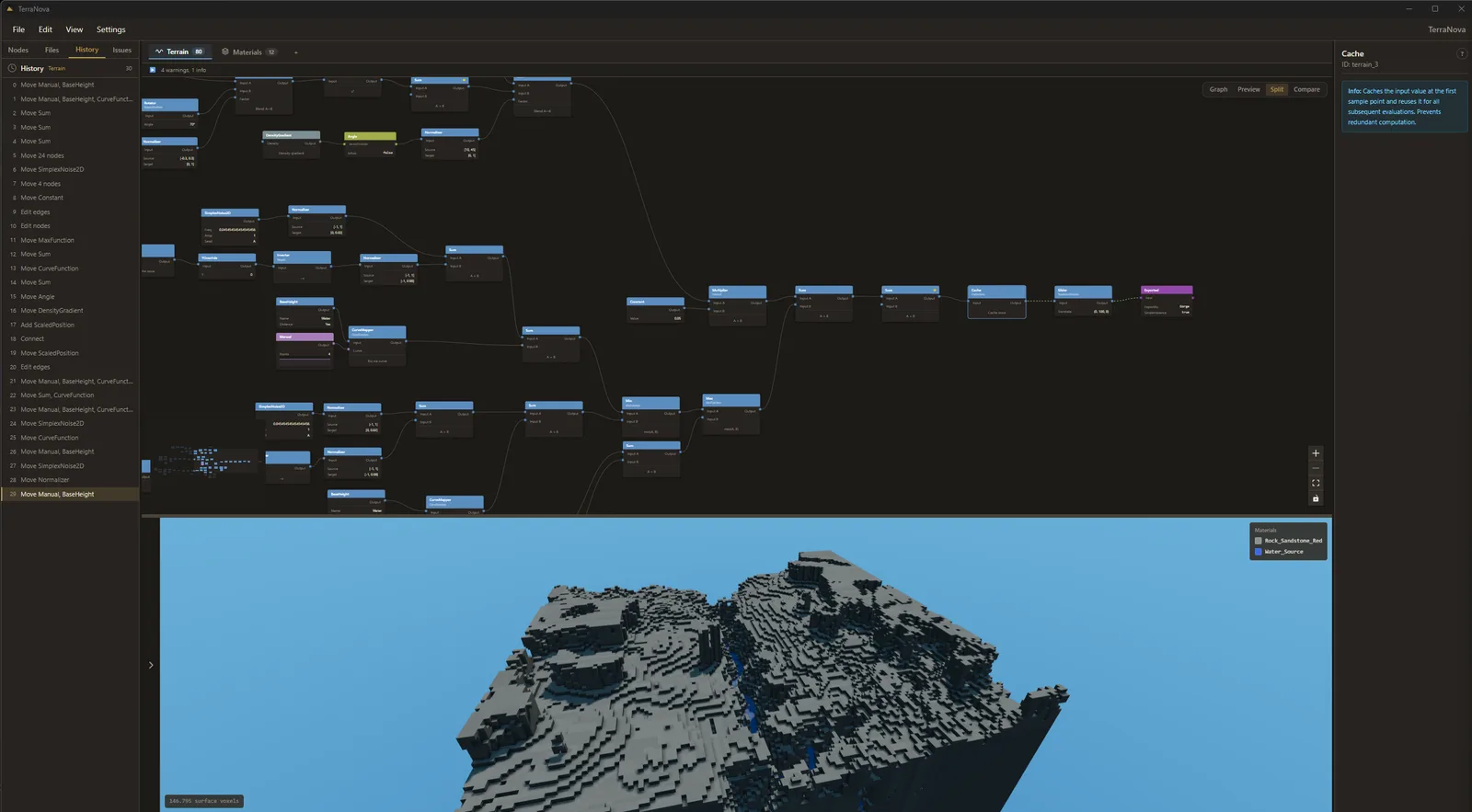
The editor. Graph, preview, and inspector share one window.
- Node graph
- Live preview
- Inspector
- Validation strip
Architecture
The editor is TypeScript in a Tauri shell. Generation and preview rendering are Rust, because the preview has to keep up with a parameter being dragged. Export and validation sit between them, and the Bridge plugin carries the result into a live server.
Development history
Published releases, newest first. This list is pulled from the repository rather than written here, so it cannot drift from what actually shipped.
Limitations
Known and accepted, as of the current alpha:
- The preview approximates. It is close enough to make decisions from, and it is not a substitute for loading the world.
- The Bridge plugin requires a server you control. There is no path for hot-reloading into a server you are only a player on.
- Very large graphs slow the editor before they slow generation. The bottleneck is graph layout, not terrain.
- Hytale itself is a moving target. Schema changes upstream can invalidate templates that were valid at export time.
Next milestone
The alpha channel is where the work is happening. The current thread is trusting the preview: narrowing the gap between the preview renderer and the generation core, and making density fields inspectable so the numbers behind a piece of terrain can be read directly rather than inferred from its shape.